Apple Wallet · Included at no cost

Your account activity.
A head start on your plan.

Connect an eligible account through Apple Wallet. Bring available balances and transactions into Sort All Money, then choose what belongs in your payday plan.

Connection, available transaction imports and Wallet-assisted setup are free. You can also use Sort All Money entirely by hand.

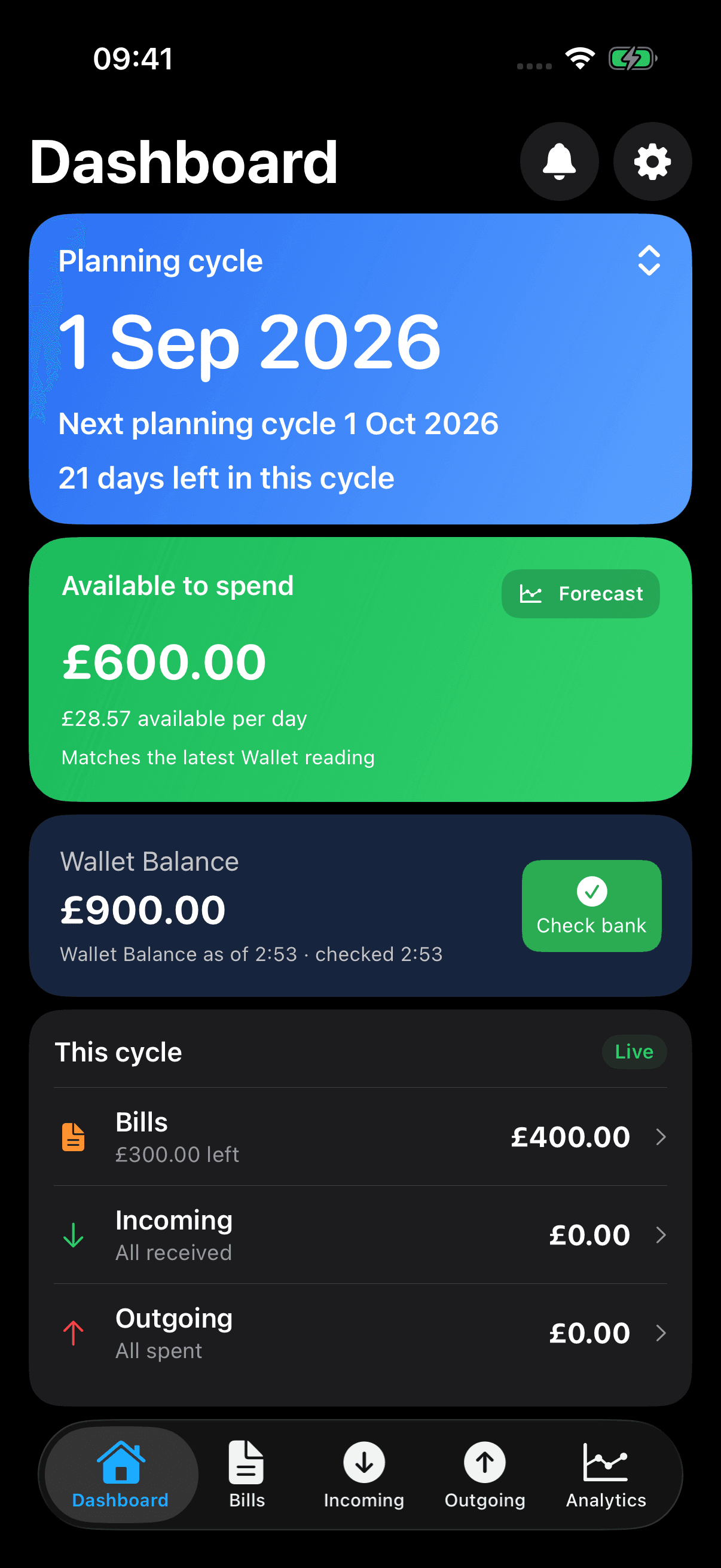
Selected suggestions for Meadow Energy £70 monthly, Northfield Studio income £2,400 monthly and Clearline Broadband £30 monthly, each with an Edit control.

Genuine app capture with synthetic Wallet activity. These selected bill and income suggestions are proposals, not saved entries. Sam 1.6 (11), captured 10 September 2026.

Free help with your first plan

Start from activity.
Finish with your choices.

Available activity can include Direct Debits and standing orders as well as purchases. It does not have to be a payment made with Apple Pay.

Connect with permission.

Choose an eligible account and allow access to its available balances and transactions. Sort All Money does not ask for your bank password.

Review the suggestions.

Check suggested bills and income, then edit amounts and schedules. The available history determines what Sort All Money can suggest.

Make the plan yours.

Choose relevant current-cycle payments, check what is already paid and review your starting balance before saving.

Can I change a suggested bill?

Yes. Check its name, amount and schedule, make any changes, then confirm it. A suggestion is not saved to your plan until you choose it.

As payments happen

Keep Wallet free.
Choose extra help with matching.

Sort All Money

Your activity. Your decisions.

Refresh and view available Wallet balances and transactions. Select what to import yourself, or make a visible balance correction.

A correction records the difference you choose to apply. It does not claim to identify which payments caused it.

Optional Sam Plus

Balance Match.

Get automated matching and assistance reviewing differences between your plan and your bank. Sort All Money suggests relevant activity; you review financial changes before applying them.

A matching total is a suggestion to check, not proof that those payments explain the difference.

See a completed Balance Match example

Sam 1.6 (11), 10 September 2026. This fictional example uses synthetic Wallet data and shows the review and saved result.

Fictional example: review a £100 bill payment, apply the change, then return to the updated plan. Synthetic Wallet data; not a demonstration of live bank delivery.

01 · Before the check

Already in the plan.

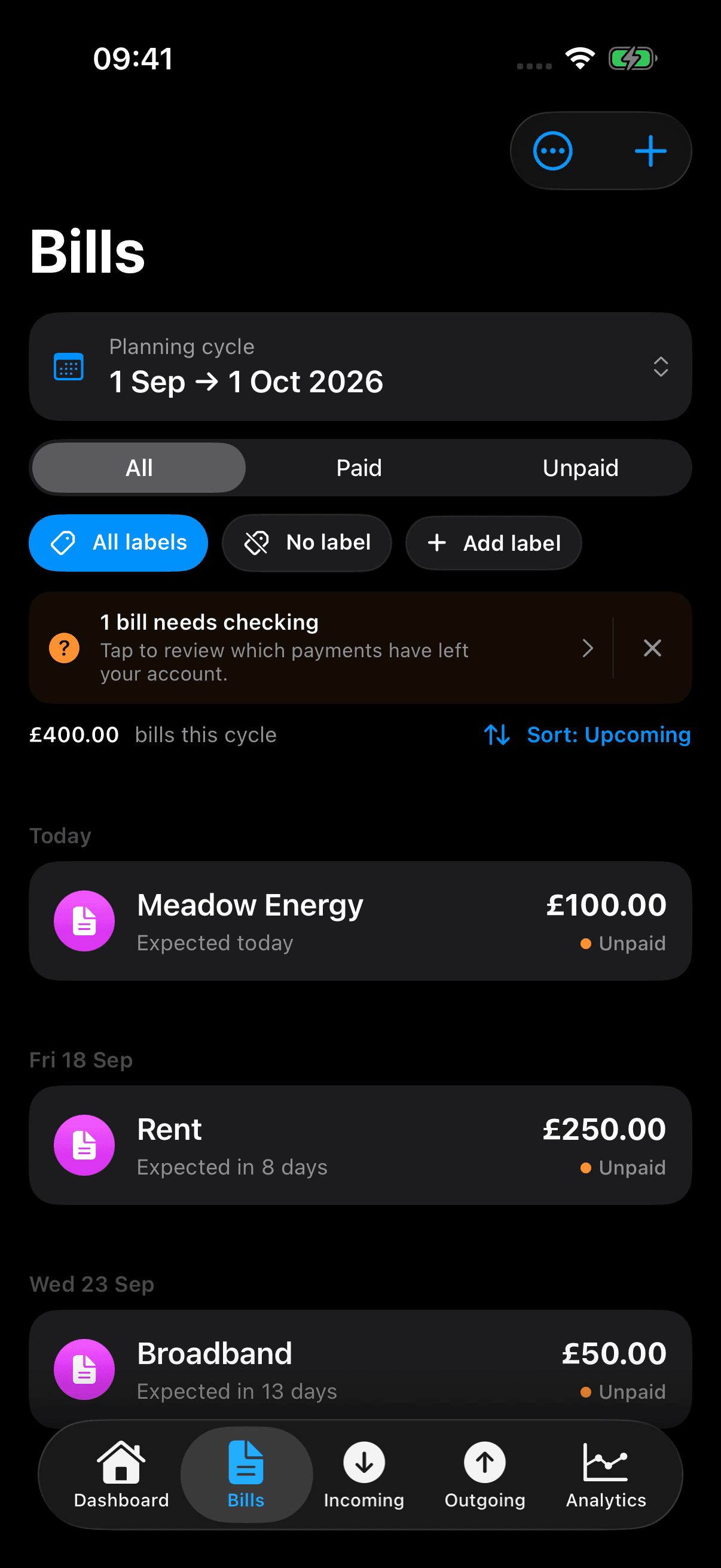
The £100 bill is unpaid. It is already included in the £400 of commitments.

Before the check: choose Bill or Plan
Sam Bills showing the fictional Meadow Energy £100 bill unpaid, alongside Rent and Broadband.

Before: Meadow Energy is an unpaid £100 bill due 10 September 2026.

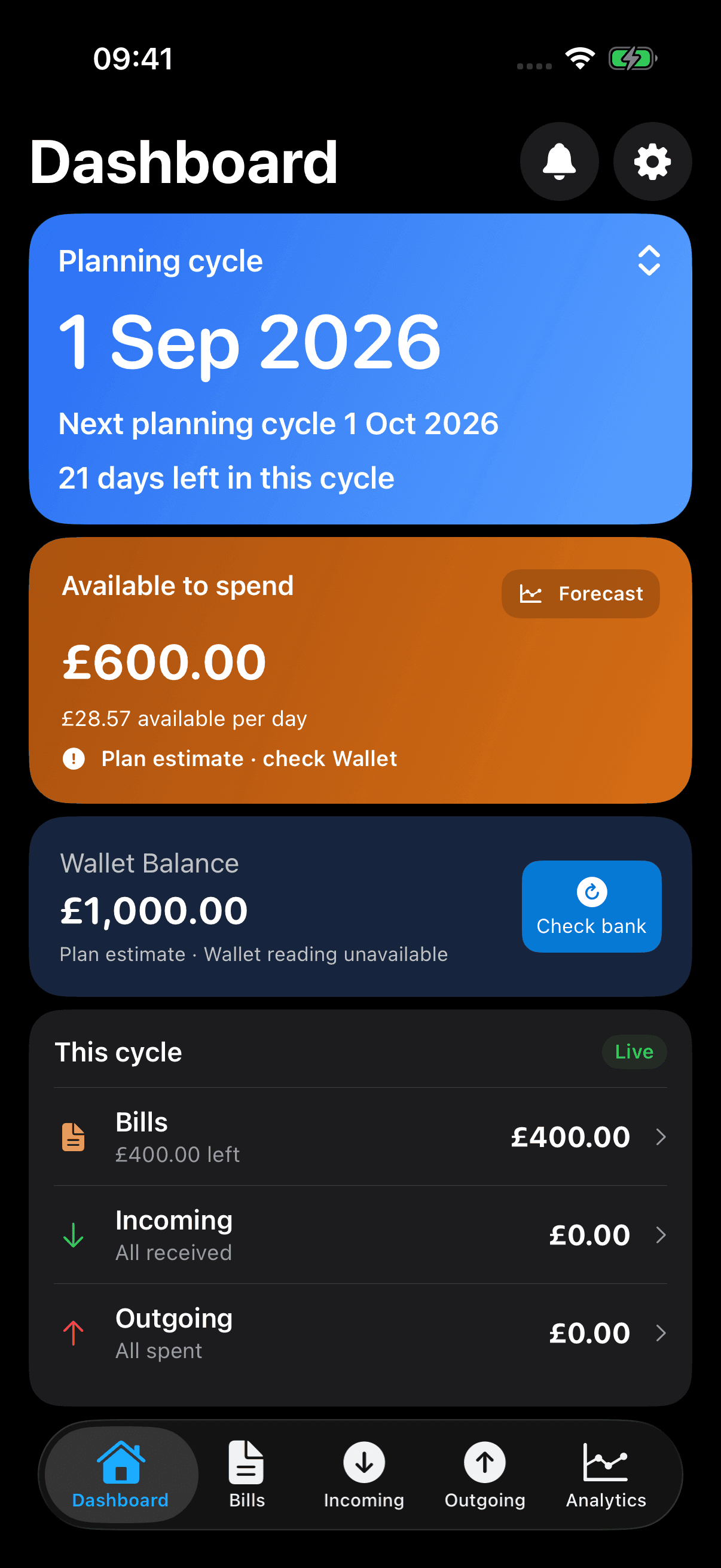
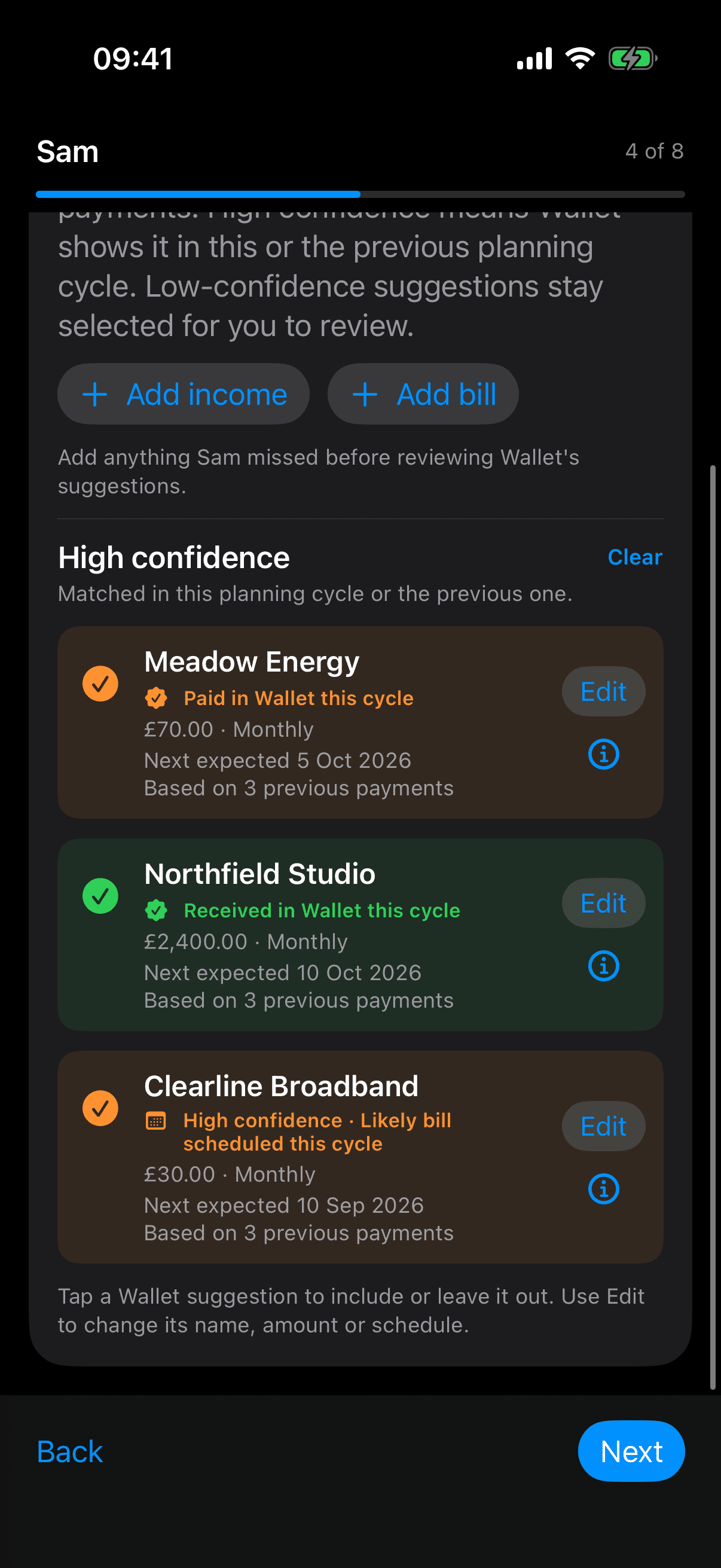
Sam Dashboard before the fictional payment, showing a £1,000 plan estimate, £400 bills left and £600 available to spend.

Before: £1,000 plan estimate, £400 of unpaid bills and £600 Available to Spend. No Wallet reading is available yet.

02 · Before Apply

Review. Then apply.

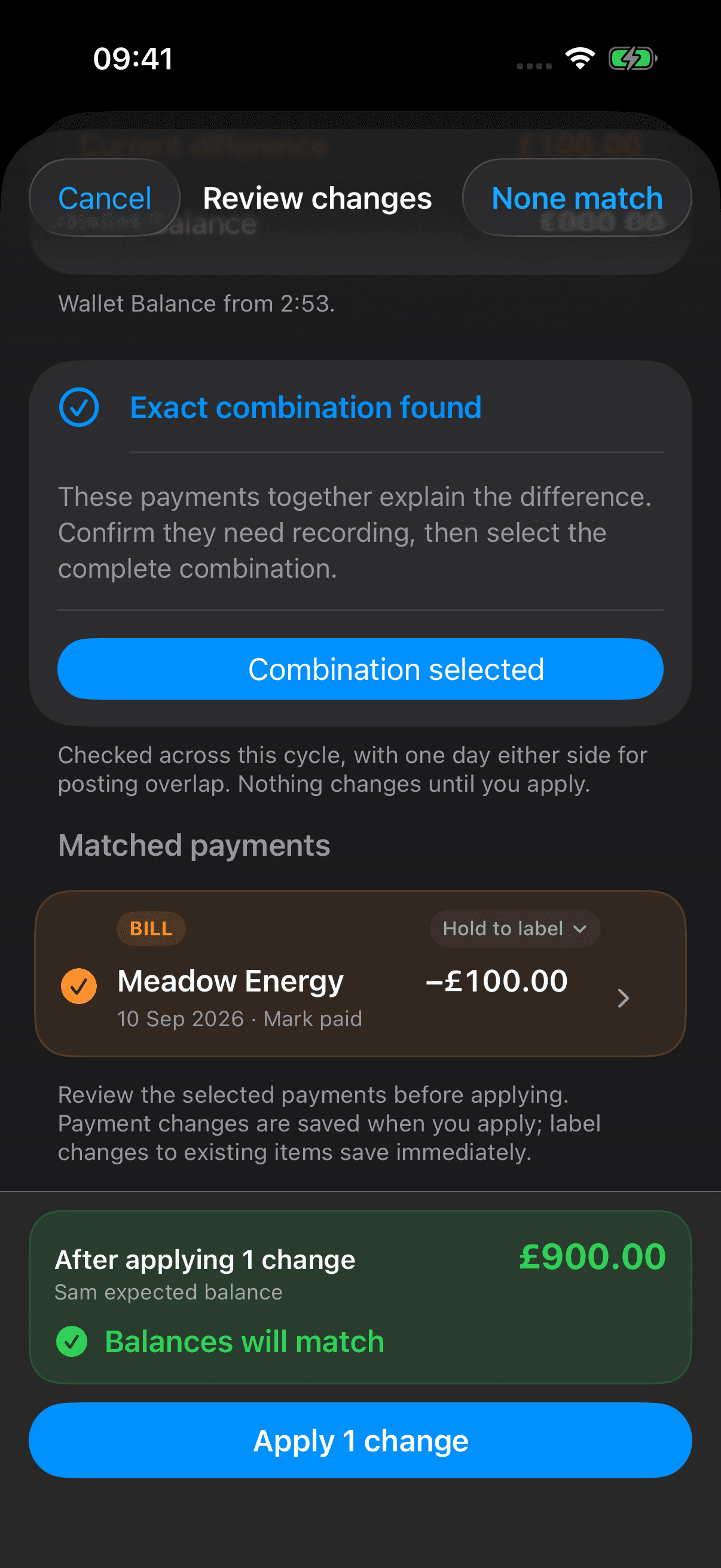
Check the matched bill and predicted £900 balance before confirming the change.

Selected Meadow Energy £100 bill dated 10 September, proposed action Mark paid, predicted £900 balance and Apply 1 change button.

Before Apply: mark the existing £100 Meadow Energy bill paid; the predicted recorded balance is £900.

03 · After Apply

Paid. Plan updated.

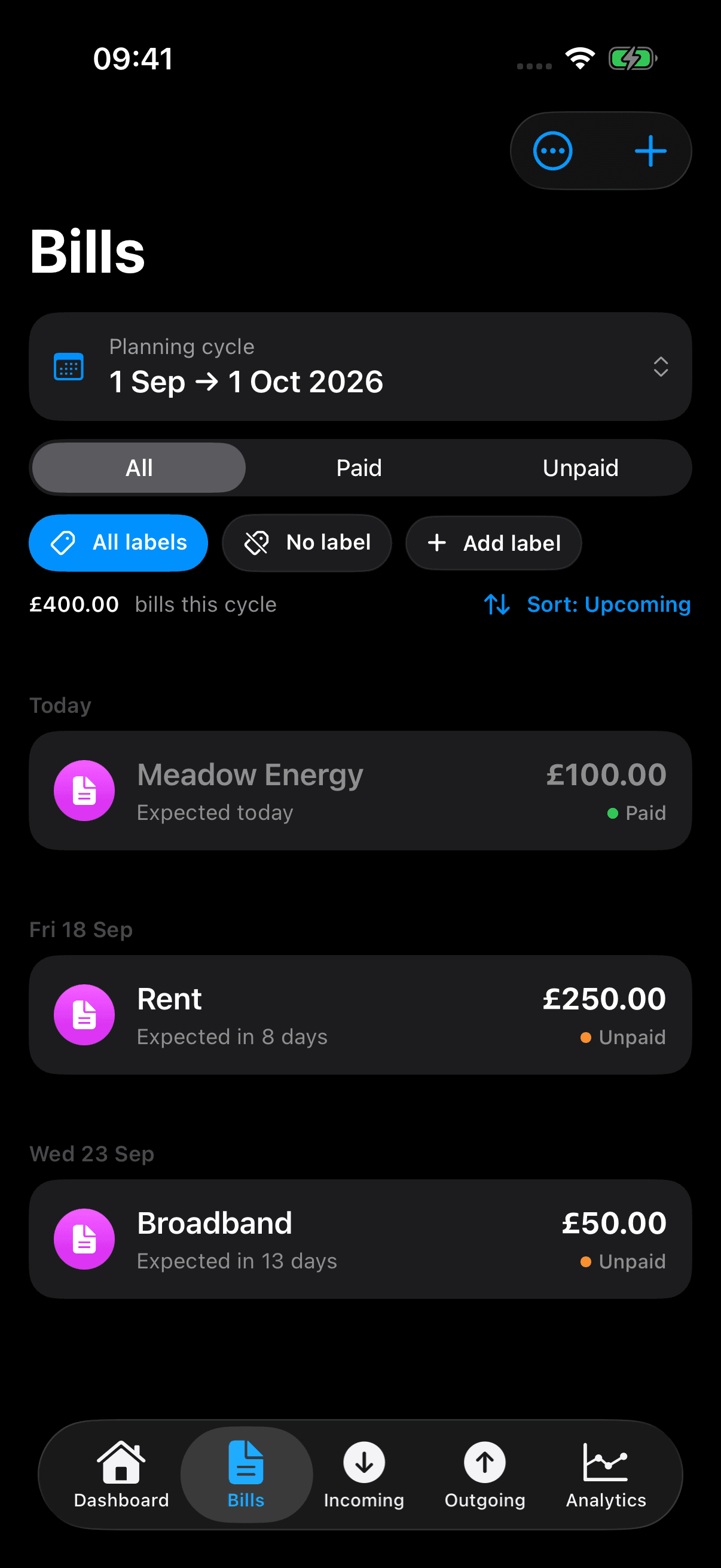
The same bill is now paid. £300 of bills remain; £600 is still available to spend.

After Apply: choose Bill or Plan
The original fictional Meadow Energy £100 bill marked Paid; Rent and Broadband remain Unpaid.

After Apply: the same £100 Meadow Energy bill is now paid.

Updated Sam Dashboard showing £900 Wallet Balance, £300 of unpaid bills remaining and £600 available to spend.

After Apply: £900 Wallet balance, £300 of bills left and still £600 Available to Spend.

Available to Spend, before and after

£600 to £600

The balance falls by £100 and the unpaid commitments fall by £100. Because this bill was already allowed for, it is not deducted from Available to Spend again.

About this fictional example

One existing, one-off bill, in a single fictional plan. The starting £1,000 is a plan estimate: a Wallet reading is unavailable. After applying the payment, the recorded plan and synthetic Wallet balance both show £900. The £400 total bills includes the paid bill; £300 is left to pay.

The cycle runs from 1 September to the start of 1 October 2026, with no expected income or planned outgoing spending in this example. The £28.57 daily guide is £600 divided by 21 remaining days, rounded. These figures are planning estimates.

Approved payment relationships can connect Wallet activity to existing records. A saved link alone does not create another expense or mark a bill paid; this example explicitly applies a financial change after review.

Before you connect

Check your account.
Keep a manual option.

Wallet access depends on the account, region, device, operating system and your permission. An Apple Pay card alone is not enough, and not every bank or account is supported.

What does my account need?

Sort All Money uses one eligible connected current account that supplies usable balance and transaction activity. In Apple Wallet, look for “Get Account Balance & Activity”. Sort All Money still needs to check the data your account shares.

Sort All Money is planned for iPhone with iOS 26 or later.

Apple’s connected-account guidanceSort All Money compatibility help
What stays under my control?

You choose whether to connect and review financial changes before applying them. Sort All Money uses Apple’s FinanceKit for authorised data; Sort All Money performs the matching. Sort All Money never holds or moves your money.

Disconnecting clears local Wallet and matching state. Your plan, imported history and separately saved backups remain.

How Wallet information is handledUse Sort All Money manually
How current is the information?

The time Sort All Money last checked is different from the bank’s latest data time. Available activity and background updates depend on Apple, your provider and permissions. Sort All Money cannot make your bank update sooner.

Refreshing Wallet does not automatically record every financial change in your plan.

Refresh and background help
Can I import earlier activity?

Available eligible Wallet transactions can be imported for free. History depends on the account and provider; Sort All Money cannot promise a fixed amount. Review transactions and duplicate warnings before importing earlier completed cycles.

Historical evidence is separate from today’s plan. Reporting, trends and analytical comparisons belong to Balance Visualise in Plus.

Wallet-history details
What if a payment is already in my plan?

A Wallet payment with no saved link is not necessarily missing spending. It may already be covered by a bill, a combined payment, a reimbursement or your opening balance. Review the evidence before recording it again.

Grouped-payment helpReimbursement helpPending-payment help

Continue exploring

See the plan beyond the connection.

Sort All Money is coming soon for iPhone. Explore how its free planning and optional Plus features fit together.